|
AMM: Digital Exercise #7: Loop Player Exercise
|
|
Using "Reason 2.0" create a 1 minute (minimum) piece using 3 "loop players."
|
|
1) Open "Reason 2.0" and load the "DrRexLooping" file.
- Start/Programs/Propellerhead/Reason 2.0
- File/ Open
- 4Student/Out/ThompsonPa/Music_Computers/Reason/"DrRexLooping.
|
|
|
2)Load a "loop" into the Dr Rex 1 loop sample player.
|
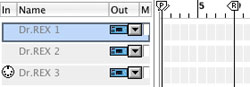
- Click on "Dr. Rex 1" in sequencer display.
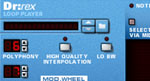
- This should take you to the Dr. Rex1 Dr:rex Loop Player.
|
|
- Click on the "Browse Loop" button.
- "folder" icon to right
of up/ down arrows.
- Select a Loop.
- Loops available from within Reason folder.
- C:/ProgramFiles/Propellerhead/Reason
- Also available from Out Box:
- 4Students/Out/ThompsonPa/ Music_Computers/Reason
|
|
|
|
|
|
| 3) Add the
"loop" to the sequencer. |
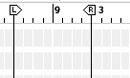
- Use the "left/ right locators" to select the area of the sequence
to add the loop.
- Make sure you are on the "Dr. Rex 1" track of the sequencer.
|
|
- Click the "To Track" button on the Loop Player.
|
|
|
|
|
|
|
|
|
4) Repeat
Steps "2 & 3" for the "Dr. Rex 2" and "Dr. Rex 3" loop players.
5) Edit your piece.
- Stop and Start the loops by using the "left/ right locators.
|
- Select various "loop sections" from the sequencer tracks which
can be moved, deleted, copied, etc.
|
|
|
6) Save
your piece on your G Drive space.
7) Hand in to:
4Student/In/ThompsonPa/Music_Computer/Digital/Exercise7 |
|
|
| |